Note:
- In Any module, the first step is Select Instance (Project).
- This post configuration module is used to manage the all posts related to a selected instance.
- These post will be shown when you will use the predefined field named as "Post" in the form and same instances as selected in post configuration.
This post configuration module is used to manage all the post used in an exam.
So let's continue to learn about the post configuration module:
- When you will open the "Post Configuration" module, you will see the list of existing post if this page is blank.
- You will have to create the new post, by using the Add Post button present at the bottom of the page.
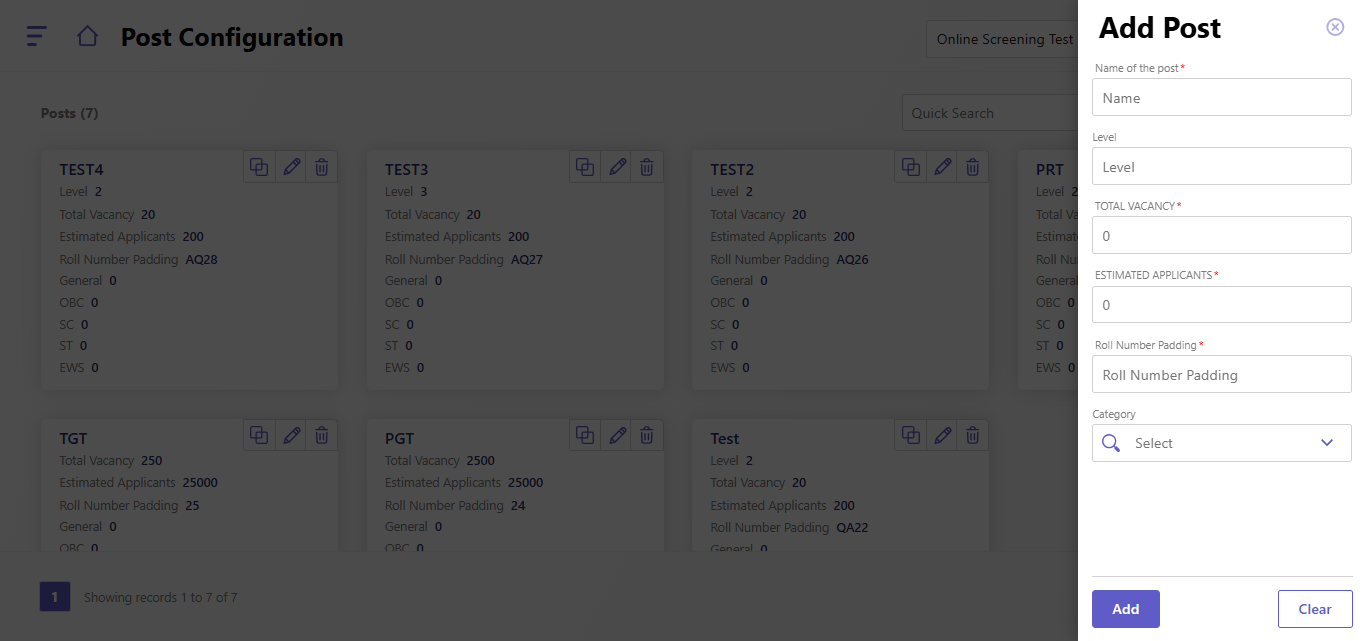
- Then, Add Post popup will open then fill these below details:
- Name of the post
- Level
- Total Vacancy
- Estimated Applicants
- Roll Number Padding
- Category
- Click on "Add" button to add this post.
- Use "Clear" button to clear the post details.
Created with the Personal Edition of HelpNDoc: Streamline Your Documentation Process with HelpNDoc's Intuitive Interface