Note:
- In Any module, the first step is Select Instance (Project).
- The PWD (Persons with Disabilities) Master module allows administrators to manage disability categories by adding, editing, or removing records related to a selected instance.
- These pwd master data will be shown when you will use the predefined field named as "pwd, pwd disability" in the form and same instances as selected in Pwd master.
Following are the below steps to add the pwd:
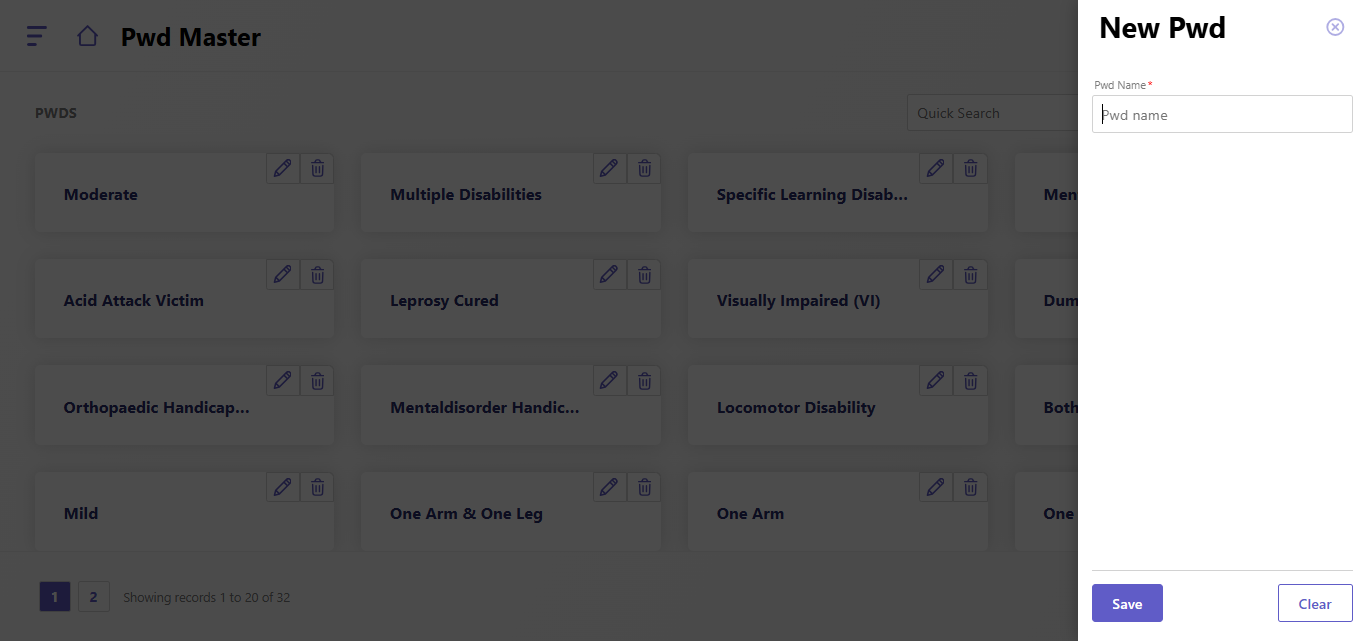
- Click the Add New button.
- The New PWD panel opens on the right.
- Enter the disability name in the PWD Name field (mandatory).
- Click Save to add the entry to the PWD master list.
- To reset the form, click the Clear button.
Steps to editing an existing PWD entry
- Locate the desired PWD card and click the Edit Icon (Pencil).
- The New PWD panel opens with the existing name pre-filled.
- Modify the PWD Name field as needed.
- Click Save to update the record.
Steps for deleting a PWD entry
- Locate the desired PWD card and click the Delete Icon (Trash Bin).
- Confirm the deletion in the prompt (if applicable).
- The record will be permanently removed from the list.
Created with the Personal Edition of HelpNDoc: What is a Help Authoring tool?