Note: The exam cities will appear in the Test Preference Location field when creating the form. If you are using the Test Preference field in any form, you may need to select the locations based on your requirements.
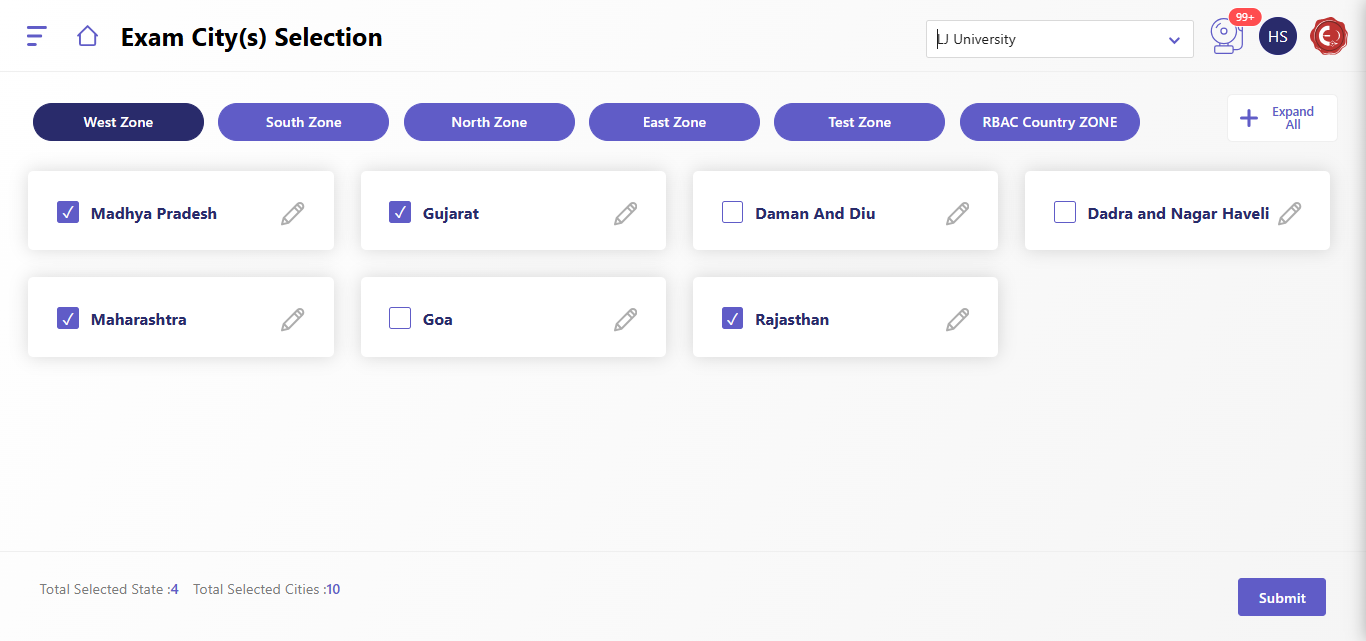
The Exam City(s) Selection interface presents a list of states and cities organized by zone. Users can select desired cities for the exam.
Selecting Exam Cities:
- Access Exam City(s) Selection: Log in to the system and navigate to the Exam City(s) Selection section.
- Select Zone: Click on the desired zone (East, South, West, RBAC Country, North, or Test) to expand the list of states and cities within that zone.
- Select States and Cities:
- Click on the checkbox next to a state to select all cities within that state.
- Click on the checkbox next to a specific city to select that city.
- You can also use the search bar within each zone to filter cities by name.
- View Total Selections: The interface displays the total number of selected states and cities at the bottom.
- Submit Selection: Once you have selected all desired cities, click on the "Submit" button to confirm your selection.
Created with the Personal Edition of HelpNDoc: Experience a User-Friendly Interface with HelpNDoc's Documentation Tool