Note:
- In Any module, the first step is Select Instance (Project).
- This eligibility data will be used in the form creation based on the client requirement.
- For use that data in the form, you will have to use the predefined field in the form. for example: Country, State, City.
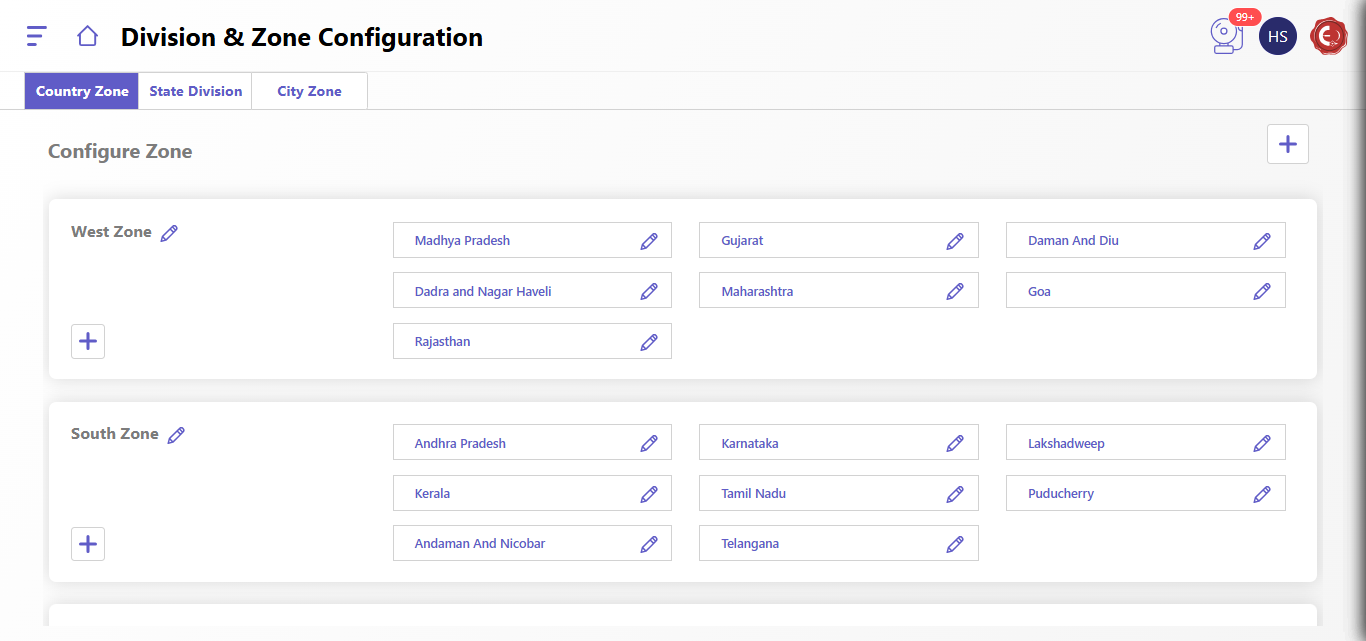
The Division & Zone Configuration interface allows you to manage the division and zone structure for your organization. It consists of three main sections:
- Country Zone: Displays the country and its corresponding zones.
- State Division: Displays the states within each zone and their respective divisions.
- City Zone: Displays the cities within each division and their corresponding zones.
Configuring Zones:
- Access Division & Zone Configuration: Log in to the system and navigate to the Division & Zone Configuration section.
- Click Configure Zone: Click on the "Configure Zone" button.
- Select Zone: Choose the zone you want to configure from the list.
- Add/Edit Divisions: You can add new divisions or edit existing ones using the "Add" and "Edit" icons next to each division.
- Add/Edit Cities: Similarly, you can add new cities or edit existing ones within each division using the "Add" and "Edit" icons.
- Save Changes: Click on the "Save" button to save your changes.
Created with the Personal Edition of HelpNDoc: Easily create CHM Help documents