Note:
- In this module, the first step is Select Instance (Project) for which you want to see the dashboard.
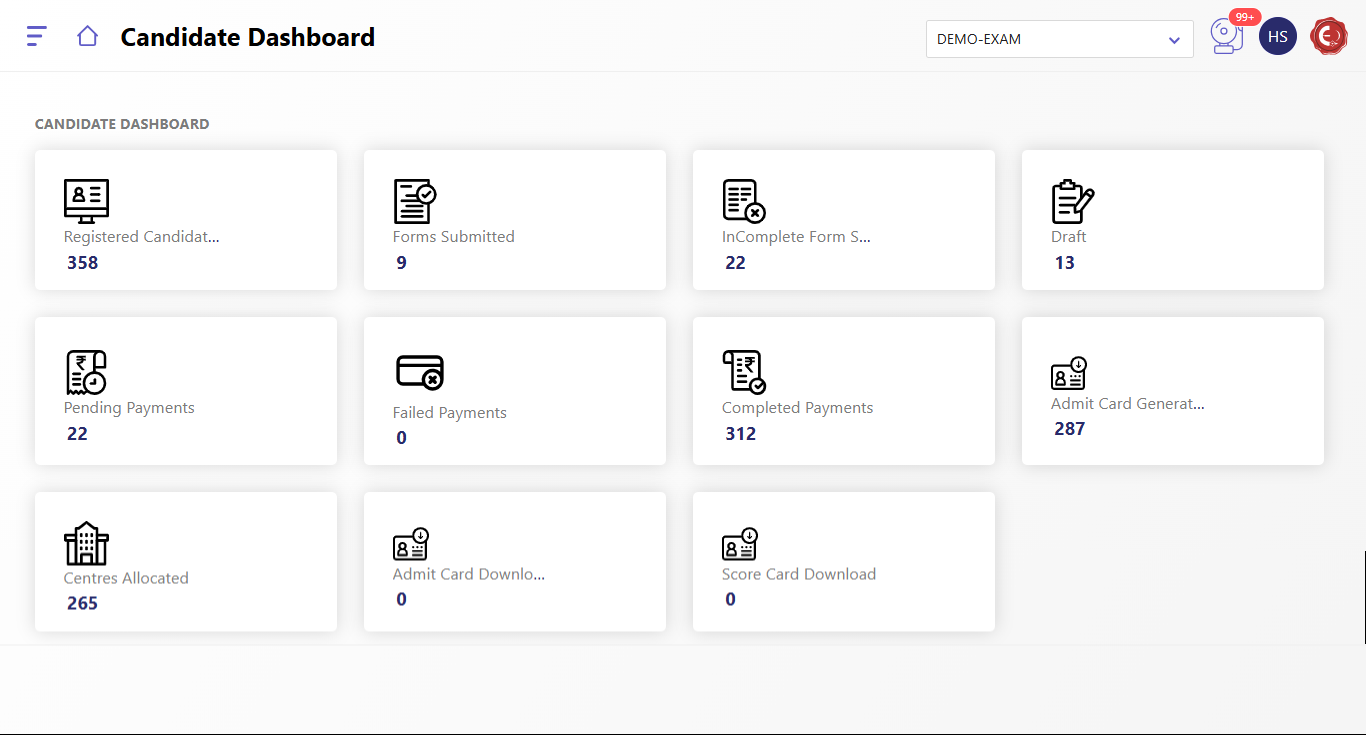
The Candidate Dashboard provides real-time insights into various stages of the examination application and allocation process. The key metrics include:
- Registered Candidates: Total number of candidates who have registered for the examination.
- Forms Submitted: Number of candidates who have successfully completed and submitted their application forms.
- Incomplete Form Submission: Number of candidates whose forms are incomplete and need further action to complete the process.
- Draft: Number of application forms saved in draft mode but not yet submitted.
- Pending Payment: Number of candidates whose payment process is incomplete.
- Failed Payments: Number of candidates whose payment attempts were unsuccessful.
- Completed Payments: Number of candidates who have successfully completed their payment process.
- Admit Card Generated: Total number of admit cards that have been generated for candidates.
- Centers Allocated: Number of candidates for whom examination centers have been successfully allocated.
- Admit Card Download: Number of admit cards downloaded by candidates so far.
- Score Card Download: Number of scorecards downloaded by candidates after the exam.
This dashboard serves as a comprehensive overview for administrators to track candidate progress and manage the examination workflow effectively.
Created with the Personal Edition of HelpNDoc: Transform Your Documentation Workflow with HelpNDoc's Intuitive UI