Allocation Request
Note:
- In any module, the first step is Select Instance (Project).
- This allocation request will be used to assign specific resources or assets required for conducting an exam.
- If there is no data visible in this module, first you will have to add the assests data in "Manage Assets".
An Allocation Request for Assets is a formal request used to assign specific resources or assets required for conducting an examination. This request ensures that necessary items such as examination materials, or servers are allocated and reserved for the designated exam, based on predefined requirements and availability.
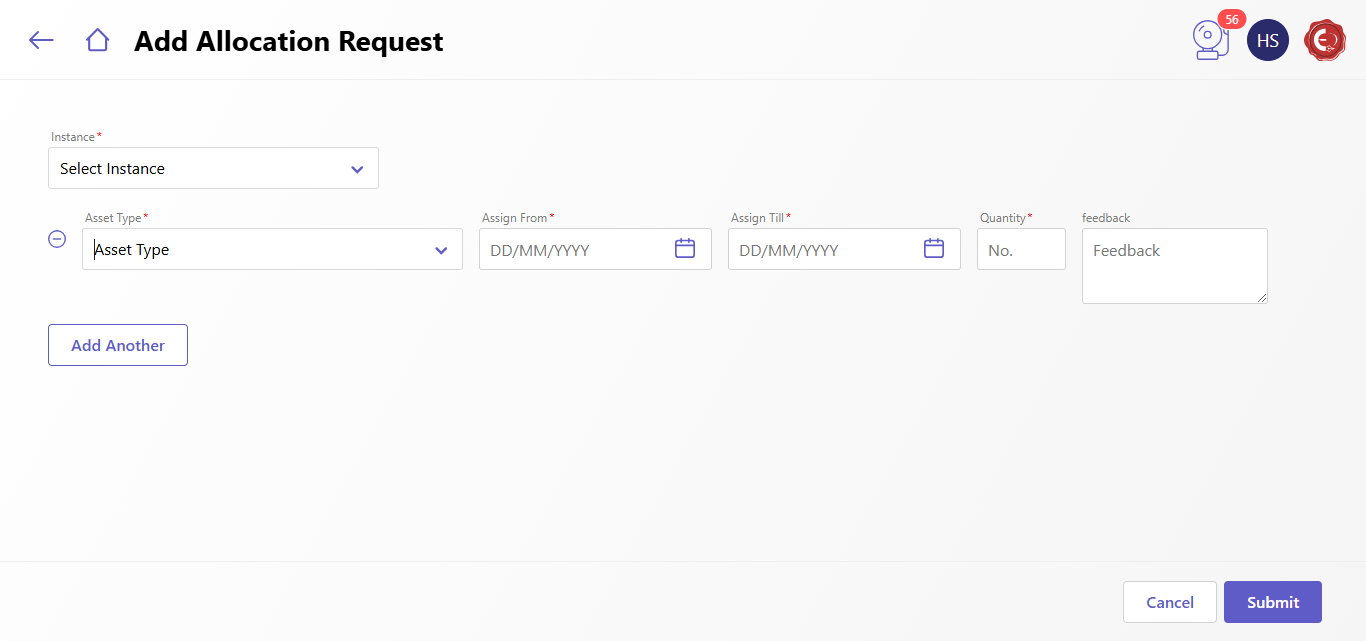
Follow these given steps to add the allocation request:
- Select the instance for which you want to raise the allocation request
- Select the Asset Type such as Computer, Laptop, Mobile etc.
- Select the Assign date from to Till Date.
- Enter the quantity of the assets
- Enter the feedback for Assets if any.
- To Add another asset, click on "Add Another" Button and fill the same details as mentioned in above points.
- Click the Submit button to generate the asset request, which will then be sent to the appropriate person for further action.
Created with the Personal Edition of HelpNDoc: Easy Qt Help documentation editor